Accruent Lucernex 26.07 Release Notes
We're delivering this automatic upgrade to these environments:
-
Dedicated TRAIN: July 15, 2026
-
UAT (TRAIN): July 17, 2026
-
Production: July 31, 2026
The upgrade includes:
-
Reconcile invoices: Transaction details now carry forward to the Transactions tab.
-
SL Summary: The foreign exchange (FX) rates used at straight-line (SL) summary schedule start and contract commencement are now SL Summary report generation available fields (RGAF).
-
Workflow: Customize workflow email notifications for starting and completing steps.
-
Performance improvements: Efficient and faster in:
-
Calendar week view
-
Report loading
-
Folder template application
-
Custom list loading on workflows and pages
-
-
Auth0: Streamlined sign in experience for users.
-
Scheduled jobs: New option to ensure that downstream systems only process fully transferred report files.
-
Database schema changes: New field added for improvements and issues fixed.
Reconcile a rent invoice
LUC-19891
When you reconcile invoices, important transaction details now carry forward to the Transactions tab automatically.
After you match an invoice to a payment transaction on the Invoice Review dialog, Invoice Date, Invoice Ref#, and Remit Message populate in the Transactions tab. This applies to one-time payments, retro payments, and fully allocated payment transaction matches.
Lucernex uses these rules to protect your existing data:
-
Fully allocated transactions with existing values: If Invoice Date, Invoice Ref#, or Remit Message already contain data, your values are preserved. Nothing is overwritten.
-
Partially allocated transactions: When a remaining available amount exists on a transaction, those fields aren't updated. A confirmation message indicates the fields that remain unchanged.
Foreign exchange (FX) rate for SL Summary
The foreign exchange (FX) rates used at straight-line (SL) summary schedule start and contract commencement are now SL Summary report generation available fields (RGAF):
-
Initial Asset Balance Currency Rate: FX rate used to calculate the initial asset balance at contract commencement or accounting schedule begin date.
-
Initial Liability Balance Currency Rate: FX rate used to calculate the initial liability balance at contract commencement or accounting schedule begin date.
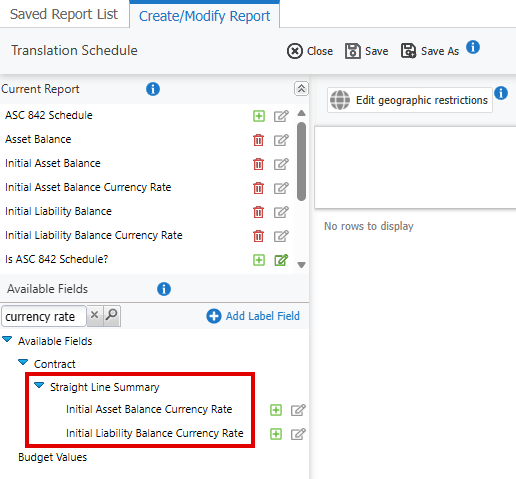
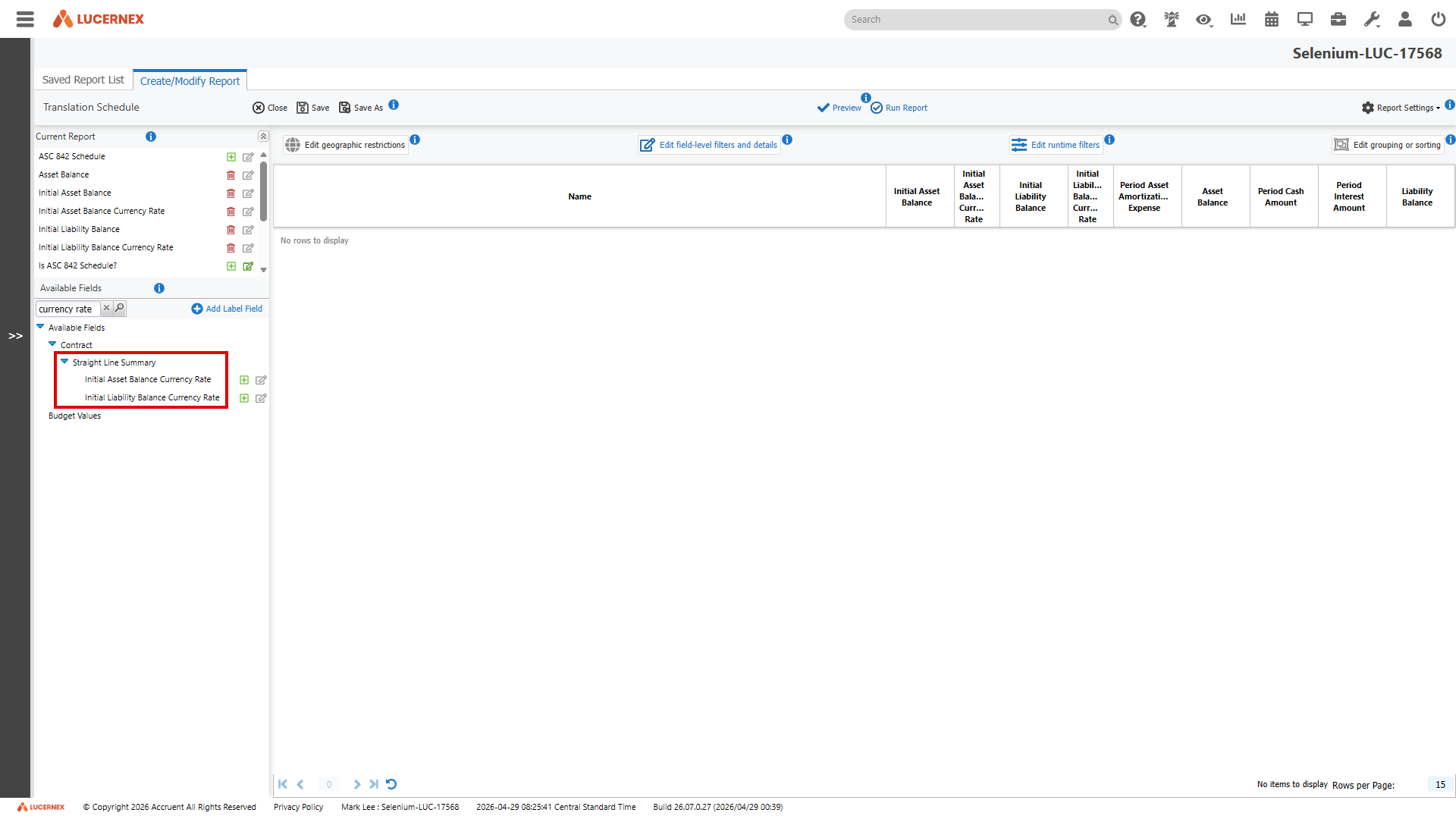
Example: If you select Calculate FX impact on an ASC 842 Rent Schedule, these fields match the Rate shown for the Target Currency you select.
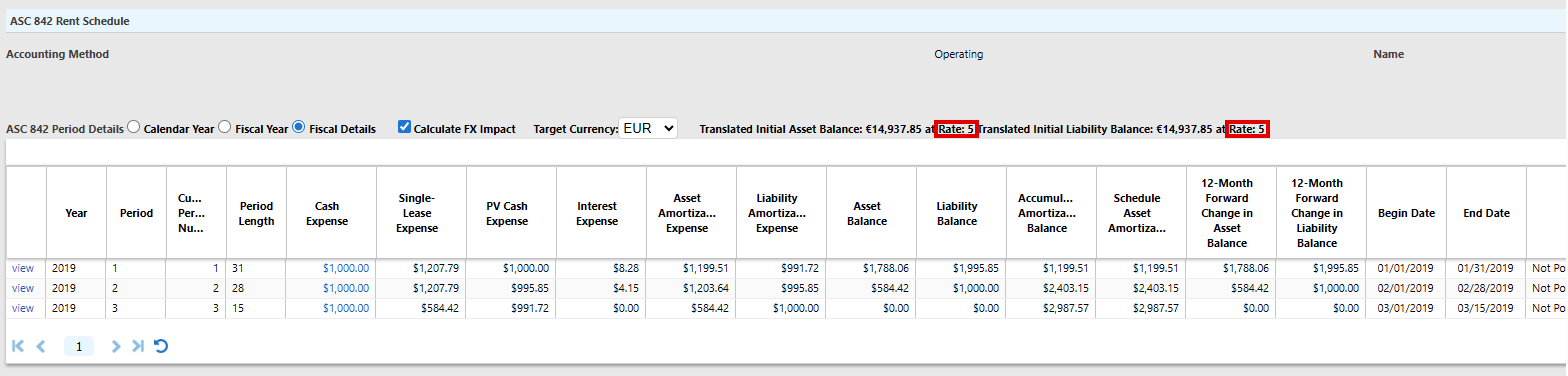
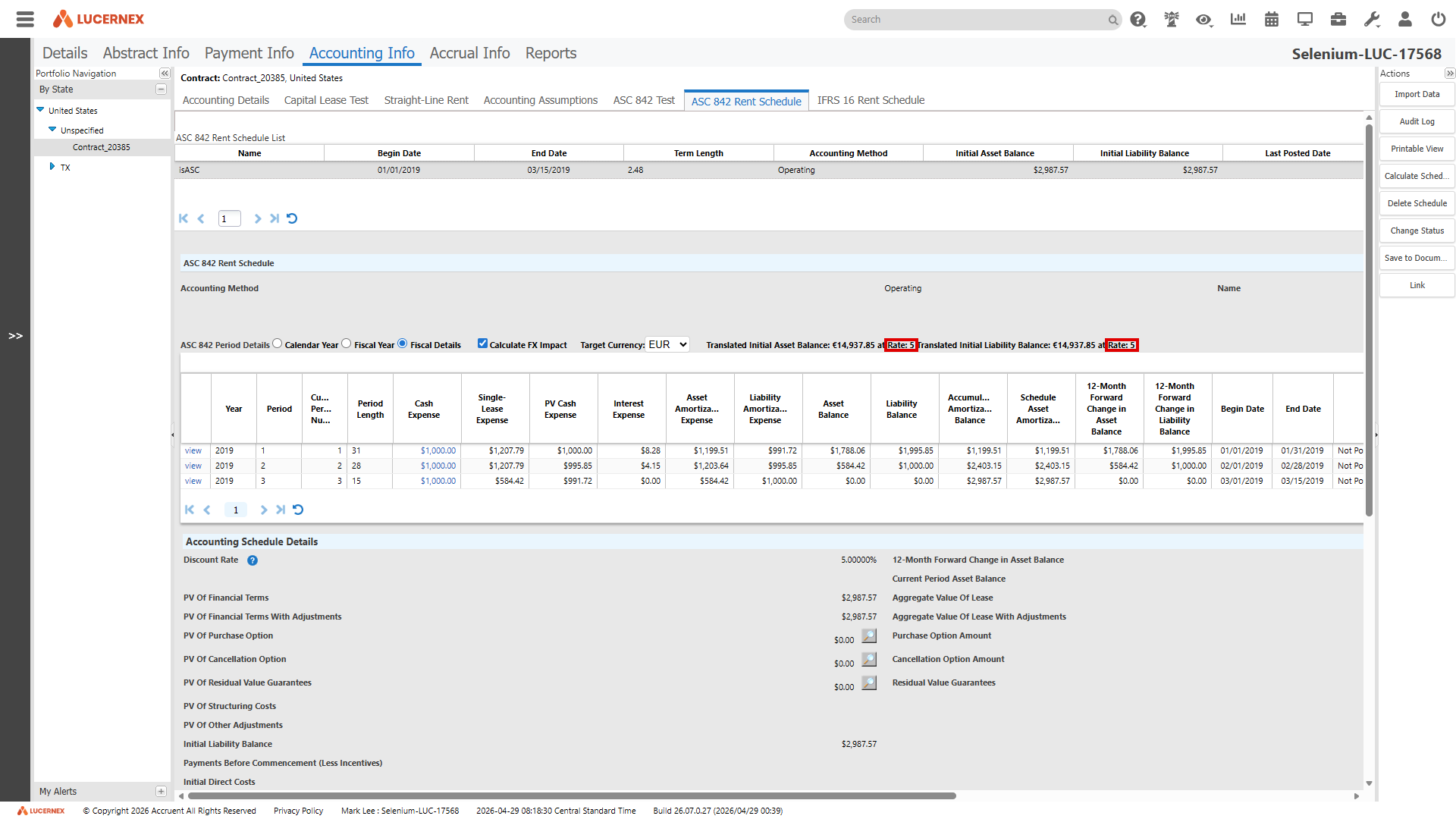
Use these rates in advanced reports, XML exports, API calls, math fields, and JavaScript fields. Previously, these rates were calculated internally but not reportable. Review the SL Summary database schema changes.
Customize workflow email notifications for step start and completion
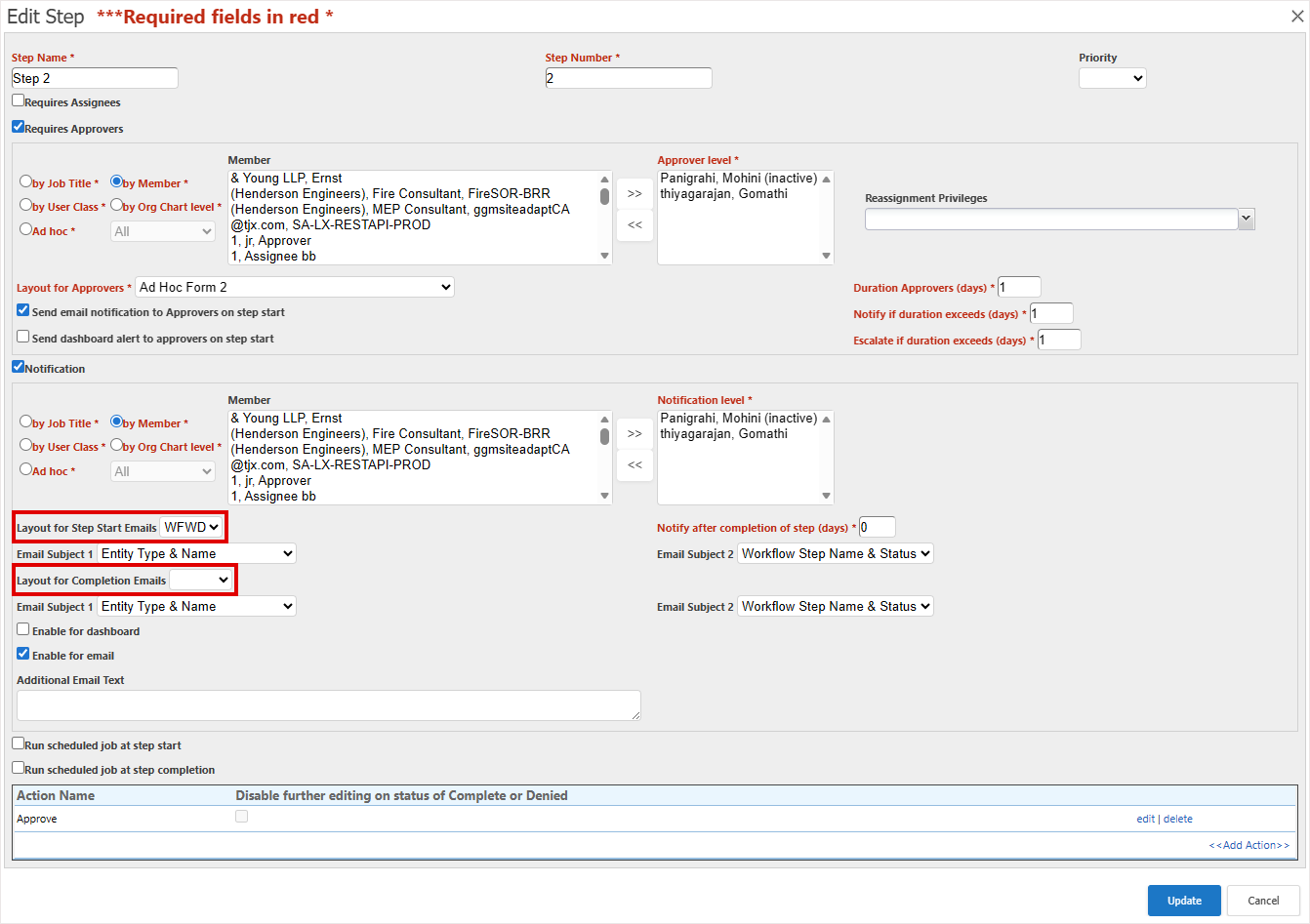
Configure separate email layouts and subject lines for step start and step completion notifications. Tailor messages to the context of each workflow stage instead of applying a single layout for both start and completion notifications.
For each workflow step configure:
-
Layout for Step Start Emails: Define the layout for step start emails.
-
Layout for Completion Emails: Define the layout for step completion and approval emails.
-
Email Subject 1 and Email Subject 2: Define subject line formats for start and completion emails.
The layout options replace the Layout for Notification Emails option added in Lucernex 26.03. If you do not set a layout, the default email format is used.
To use this feature, contact Accruent Support to request that enableEnhancedWFNotification is turned on in your firm.
When the feature is turned on, the new Layout for Step Start Emails and Layout for Completion Emails options appear in the Edit Step dialog of workflows:
- Existing workflows remain unchanged until you configure the settings that follow.
- Configure only one layout (start or completion) and use the default layout for the other.
- Each assignee or approver receives a separate email notification.
Create a notification email layout
-
Go to Admin Dashboard > Manage Forms.
-
In the Form Type where you want to create the layout, select Add Layout.
-
Enter a Page Layout Name.
-
Select Is Notification Email Layout?.
Only layouts with Is Notification Email Layout? selected appear in workflow notification options.
-
Select Allow Edit.
-
Select the Portfolios/Capital Programs the layout is available for.
-
Select Add Layout.
Configure notification emails for a workflow step
-
Go to Admin Dashboard > Manage Work Flows.
-
Expand the workflow.
-
Select Edit in the Actions column of the step.
-
In the Notification section:
- Select Layout for Step Start Emails.
- Set Email Subject 1 and Email Subject 2 for start emails.
- Select Layout for Completion Emails.
- Set Email Subject 1 and Email Subject 2 for completion emails.
-
Select Update.
Performance improvements
We've made a number of changes to improve Lucernex performance.
Calendar week view
LUC-19892
The Prior Weeks Unresolved Items list on the Week tab of the Calendar now displays unresolved events from the previous 30 days instead of the previous 365 days. This significantly improves page load times when your firm has a large number of projects.
If you previously relied on viewing unresolved items older than 30 days on this page, use these methods to find them:
-
Dashboard work queue and approvals: Add My Approvals or My Work Queue dashboard widgets to your dashboard and check for unresolved items in your work queue or approvals.
-
Reports: Run a report to find outstanding items across all projects. Go to Reports and use filters to locate unresolved events beyond the 30-day window.
-
Month View: Use the Month page associated with the weekly calendar to help you navigate to specific months and locate events by date. This does not display prior unresolved items and is unaffected by this change.
Report load time
LUC-16086
We optimized data caching to improve report load performance, reduce memory usage, and improve response times for large data.
Here are some example improvements. Actual results will vary depending on your data volume and system configuration:
|
Report |
Before |
After |
Improvement |
|---|---|---|---|
|
Workflow report |
Timed out after more than 10 minutes |
327 seconds |
Completes successfully (previously timed out) |
|
Workflow simple report |
524 seconds |
115 seconds |
Up to 78% faster |
|
Expense schedule report |
83 seconds |
5 seconds |
Up to 94% faster |
Folder templates
LUC-19476
Lucernex now applies folder templates more efficiently and reliably, particularly for large folder structures used by firms with high project volumes and complex templates.
Faster loading for custom lists on workflows and pages
LUC-18883
Workflows and pages that include large custom lists now load significantly faster. If your custom lists contain 50 or more items, you'll notice improved responsiveness when opening workflows, navigating pages, and working with purchase orders and purchase authorizations.
Streamlined Auth0 authentication
LUC-19940
We've streamlined the flow when your users sign in to Lucernex using Auth0. Users no longer have to input their email address twice.
If your organization uses Auth0 to sign in to Lucernex, review our updated Accruent Auth0 configuration information.
Scheduled jobs
LUC-18953
Select the new Show temporary file while uploading option in scheduled jobs with FTP reporting to ensure that downstream systems only process fully transferred report files.
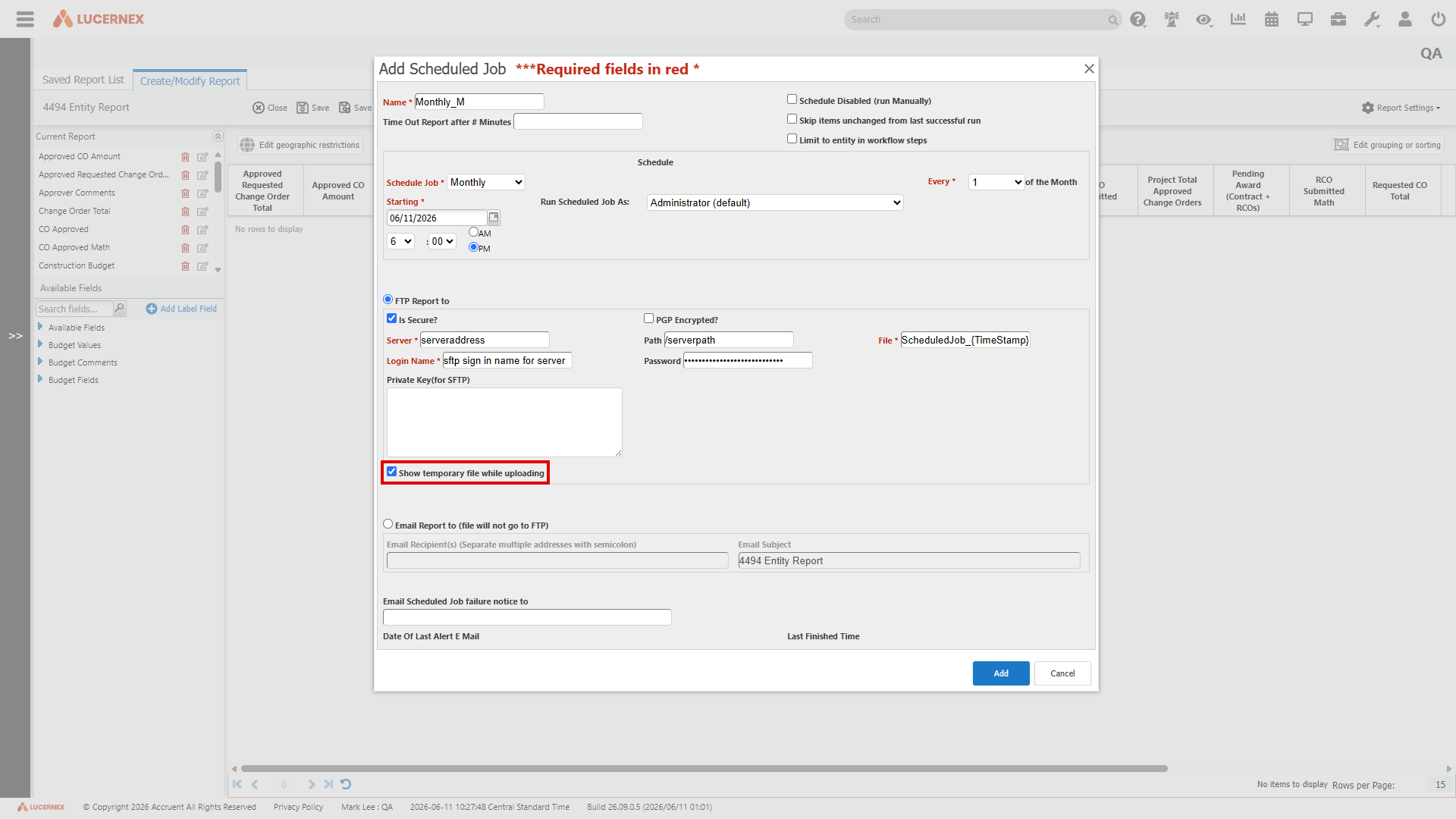
When selected, the scheduled job uses a .tmp file extension while the report transfers to the FTP server. When the transfer is complete, the file is automatically renamed to its original extension. This means your downstream processes only detect and pick up complete files, so you can rely on the data being intact.
-
In the report that you are editing, select Report Settings > Schedule Job.
-
Select Add Scheduled Job or select Edit in the scheduled job that you want to edit.
-
In FTP Report to, select Show temporary file while uploading.
-
Select Update.
If you don't select the option, FTP transfers continue to work as they do today.
Database schema changes
Benefit from new fields added to the database schema for enhancements in this release. Update your page layouts to display new fields on customized pages.
Look for  in the lower-right corner of the dialog or window to identify customized pages.
View the Data Dictionary for a full list of all fields in your firm that you can use in custom reports, including those added by your organization and those added by this release.
SL Summary
We added these fields to support foreign exchange (FX) rate for SL Summary.
|
Field Name |
Type |
UI Label |
Description |
|---|---|---|---|
| InitialAssetBalance CurrencyRate |
5-Digit Number | Initial Asset Balance Currency Rate | Foreign exchange (FX) rate used to calculate the initial asset balance at contract commencement or accounting schedule begin date. |
|
InitialLiability |
5-Digit Number |
Initial Liability Balance Currency Rate |
Foreign exchange (FX) rate used to calculate the initial liability balance at contract commencement or accounting schedule begin date. |
Improvements and issues fixed
|
Summary |
Reference # Case |
|
|---|---|---|
|
Advanced Search |
Select or clear all entities in one action with the new Select all and Clear all options for entity types, so you can choose only the entities you want to search. This makes it faster and easier to refine search results without manually selecting or clearing each entity type. |
LUC-19471 |
|
Apply offsets |
When you apply offsets to contracts using the All Contracts option in Scheduled Offsets, the offsets now apply successfully and generate payment transaction records as expected. |
LUC-18819 |
|
Change to Inactive |
On the Manage Locations, Manage Facilities, and Manage Contracts pages, the Change to Inactive link in the Planned Status column now displays correctly for any entity that contains the word Global in its name. For example, Global Sourcing. Only the system-reserved Global portfolio entity remains protected from deactivation, as intended. |
LUC-19798 |
|
Cost Tracking |
The Cost Tracking Summary now correctly displays the cumulative total of all approved change orders and payment applications for each vendor. Approved Change Order Amount and Pay App Amount columns now show the sum of all approved records rather than just the recently approved amount. This ensures that summary totals accurately reflect the full financial picture across all approved transactions. |
LUC-12532 |
|
Custom lists |
Auto refresh on custom lists now correctly retains valid line items when reconciling rows. Previously, refreshing a form could result in removal of valid PO line items. Lucernex now accurately identifies and preserves line items, ensuring your financial data remains intact during updates. |
LUC-19908 |
|
Export to Excel in Reports |
When you select the Excel export icon on the Reports page, the file downloads as expected. This applies to all browsers and session types, including private and incognito windows. |
LUC-19805 |
|
Foreign exchange (FX) rate |
Gross Asset Balance and related math fields now correctly combine asset balance and accumulated amortization and apply the exchange rate type configured under Asset Balance on the Financial Settings tab of the Manage Company page. The value updates dynamically when exchange rates change. The fields no longer incorrectly default to the period average rate instead of the configured rate. Add Gross Asset Balance to a report in Report Builder. |
LUC-19735 |
|
Form import template |
Form import now correctly assigns members when creating new forms. When you import forms using the AssignedToMemberIDs column, the assignee is now applied during form creation. Previously, the assignee was only applied during update imports. |
LUC-19809 |
|
Import |
When you import schedule tasks using a spreadsheet, Lucernex now correctly updates baseline end dates and projected end dates. Lucernex calculates these values from the start date and duration in the import file and validates that the start date is before the end date to prevent data errors. |
LUC-15182 |
|
Manage Jurisdictions |
County and jurisdiction names now display with correct spelling and formatting in the Manage Jurisdictions page. This corrects the names for Terrebonne and St. Tammany in Louisiana, LaSalle in Louisiana and Texas, and St. Joseph in Indiana. |
LUC-18311 |
|
Member audit report |
The Member Audit Report date filter now correctly returns all records for the selected period. When you run a cloned member audit report with a date filter such as Calendar Month or a custom date range, the report now returns the complete set of audit entries for the full period. |
LUC-19808 |
|
Organization Chart |
When you select Portfolio > Org Chart, that page now displays correctly even if you do not have the system administrator job function. |
LUC-19772 |
|
Page layouts |
The List Layouts option now shows all available layouts when you build a sub page layout. Invalid entries no longer prevent the option from loading. When first creating a list layout, you must select a Primary Table. This ensures the layout appears in the List Layouts option when building a sub page layout. |
LUC-17051 |
|
Percent rent accrual |
Percent rent accrual calculations now use the same calculation method as percent rent to prorate breakpoints. This aligns accrual and percent rent calculations and resolves prior inconsistencies. No changes to firm-level settings are required. |
LUC-19785 |
|
Receipt reconciliation |
Transaction selections now correctly persist across all pages during reconciliation. When you select a positive transaction on any page and then navigate to another page to select a negative transaction, the reconciliation completes as expected. |
LUC-19631 |
|
Recoveries |
We removed the redundant Save and Analyze option from the Recovery Setup dialog. This option is only intended for the dialog where you import and analyze an invoice. |
LUC-19931 |
|
Reports |
The is in filter in reports now correctly returns and displays users regardless of whether they have a Default Job Title assigned. |
LUC-12973 |
|
State and province updates |
We added 446 states and provinces across these countries:
We included ISO country codes Alpha-2 and Alpha-3 for reporting. Bosnia and Herzegovina is included as a country-level entry but has no sub-regions. |
LUC-18972 |
|
Workflow |
When a workflow task step changes a related schedule task to In Process, the task's end date now automatically adjusts to a valid date if it's in the past. The workflow completes successfully without errors. |
LUC-19774 |
|
Workflow notifications |
Workflow notification emails now correctly show all fields when a custom email layout combines subpages with standalone fields. Previously, fields could appear out of order or go missing in the notification. Emails now display all configured fields in the correct layout order and respect user security and field access permissions. |
LUC-19679 |
|
XML import logs |
Job Log summaries now correctly persist for scheduled imports that run longer than one hour. Previously, log files could become unavailable before an import completed, resulting in an error when viewing the import summary. Import logs are now available regardless of how long the job takes to finish. |
LUC-19019 |
|
Expense Schedule |
The allocation pop-up window now correctly appears when you create a one-time expense, even when multiple expense setups with overlapping expense types exist on a contract. |
LUC-19796 |
|
Forms |
When you update a form layout, the Allow users to create this form? option now correctly displays the previously saved selection. |
LUC-19773 |
|
PDF Export |
PDF exports of forms, workflows, and custom lists now correctly display financial column values without duplication, and no longer show raw HTML formatting in column output. Hide a column as normal by clearing that column in the column layout of that list. |
LUC-19766 |
|
Binder / Document Management |
Approval signatures now correctly appear in saved form documents when you add them to a binder. |
LUC-19139 |
|
Map |
The location pin now remains visible on the map after you select the Google Map view at the location level. |
LUC-17568 |
|
Reports |
Reports generated in native Excel format now open without repair errors or warning messages in Microsoft Excel. |
LUC-17371 |
|
Bidding |
Bid package templates now filter correctly by portfolio under Add Bid Package. Only templates assigned to the current project's portfolio, or templates with no portfolio restriction, appear in the list. This filtering also applies to capital projects and capital programs. Add, update, or remove portfolio filters on templates at any time, and changes take effect immediately. Removing a portfolio from a template doesn't affect bid packages that are already in progress. Invitations, awards, and notifications continue as normal. |
LUC-16905 |
|
User Management |
When you convert a contact to a member and the Cannot Reuse Recent Passwords policy is enabled in Manage Company, the "password matches a previous one" error no longer displays. The process correctly enforces all password policy settings, including minimum length, character patterns, and reuse restrictions. |
LUC-16559 |
|
Bidding |
The Printable View option on the Bidding tab now correctly displays the data for the selected bid package instead of showing data from a different package. |
LUC-16105 |
|
Workflows |
The member who completed the workflow step is now correctly shown in Modified By in a notification email. |
LUC-10927 |
|
Recoveries |
Recovery reconciliation now correctly populates only the Remit Message in the Payment Information section of the resulting payment transaction. The Description is no longer duplicated with the same value. |
LUC-19928 |
|
Workflow |
The Update & Take Action option on workflow steps now appears highlighted as the primary action when an action is available, making it easier to identify the recommended next step. |
LUC-20239 |